Migrating Form Autoresponders to Xperience by Kentico: A Deep Dive into the Database Binding Challenge
When migrating from Kentico Xperience 13 to Xperience by Kentico (XbyK), the official Migration toolkit covers a lot of object types. Like for example migrating Form objects. Unfortunately, it does not include support for migrating Form Autoresponder emails. As a result, it's recommended to handle this migration manually. In projects with many forms and custom templates, it quickly becomes clear that manual process is not realistic and the migration must be automated.
This article explains why I chose to implement autoresponders in code during a migration, what the underlying binding actually looks like, and the overall flow I followed.
🛣 Why automate autoresponders migration?
- Scale & reliability: Migrating many forms by hand is slow and error-prone.
- Template consistency: Migration is the perfect time to clean up HTML, normalize formatting, and fix sender issues.
- Idempotency: A migration usually runs more than once. Code makes it trivial to reuse existing objects instead of creating duplicates.
- Clear tracking: Good logs help you verify what was created, reused, skipped, or failed.
🏆 MCP servers for the win
Besides using LLMs for the code-heavy lifting, make sure you have Kentico Docs and MSSQL MCP servers installed. Kentico Docs was helpful for uncovering the APIs needed, and the MSSQL server was crucial for discovering the database schema.
🍃 The migration script flow (high level)
- Migrate Forms: To migrate the Form Autoresponders effectively, the prerequisite is migrating the Forms themselves, which is feasible through the official Migration tool.
- Read source data: Grab subject lines, senders, template HTML, macros, and any existing metadata. I created a custom controller that connects to the original Xperience 13 database, grabs all the necessary data, and prepares it for the migration process. This ensures that all relevant information is accurately transferred to the new system.
- Create or reuse email configurations: Prior to the migration, set up an email channel along with email templates manually. For the automated migration, implement the assignment of senders to the email channel and the creation of the email object.
- Normalize emails content: Eliminate poor HTML (unnecessary tags, attributes etc.). Substitute outdated macros with their XbyK counterparts. Cover anything that appears questionable.
- Create a binding between Forms and Emails: To make the migrated emails work as autoresponders, it is essential to establish a reliable connection between the forms and the emails, ensuring that each form triggers the corresponding autoresponder correctly. This process is complex and is described below.

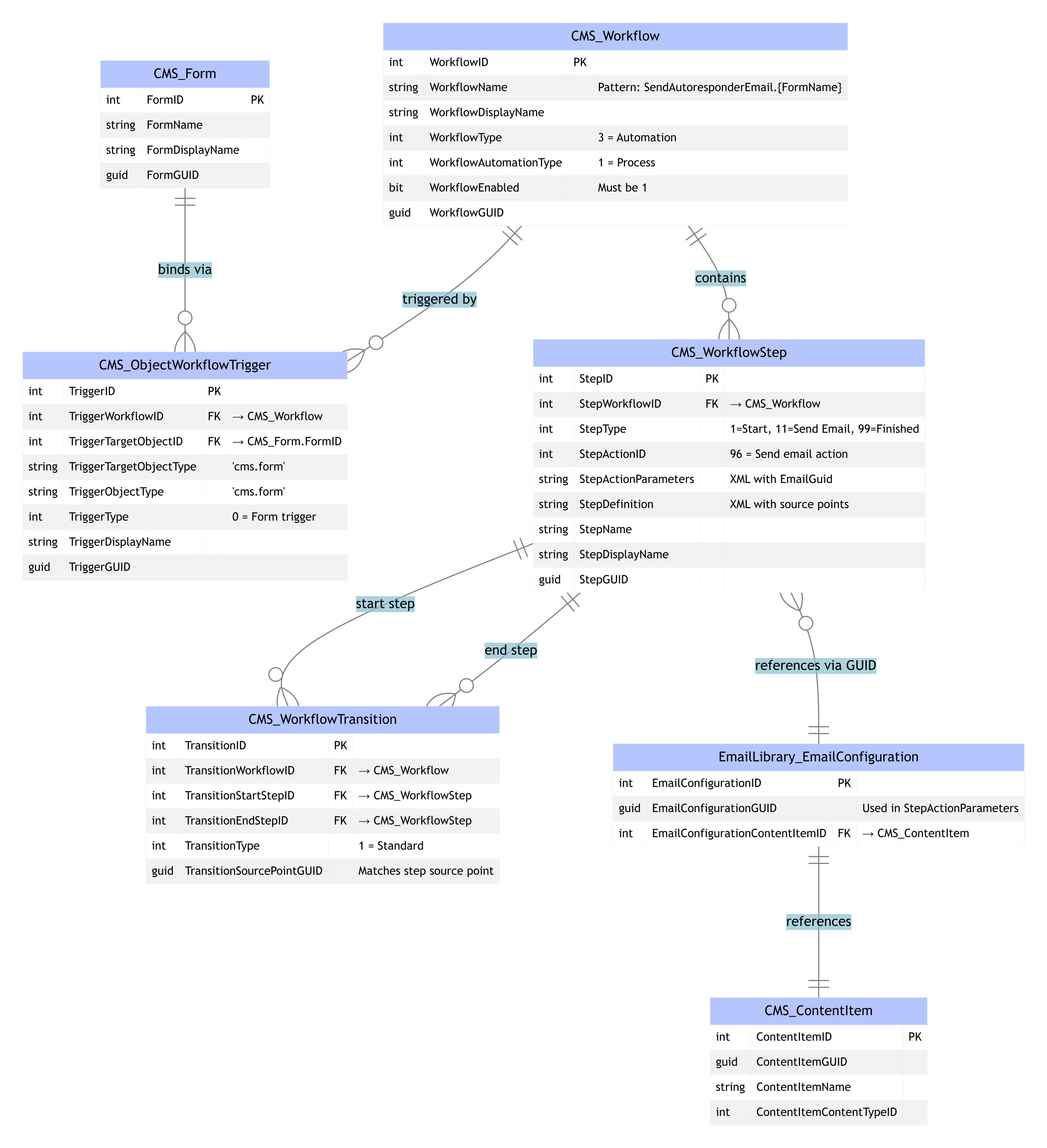
🧐 The “hidden” binding behind form autoresponders
To establish the binding between the form and the email objects, it required quite a lot of discovery at the database level and translating that into implementation using internal APIs. Here are the key findings in terms of database tables and data that represent the binding:
- Workflow (CMS_Workflow)
- WorkflowType = 3 (automation)
- WorkflowAutomationType = 1 (process)
- WorkflowEnabled = 1
- Trigger (CMS_ObjectWorkflowTrigger)
- TriggerType = 0 (form trigger)
- TriggerObjectType = 'cms.form'
- TriggerTargetObjectType = 'cms.form'
- TriggerTargetObjectID = <FormID>
- TriggerWorkflowID = <WorkflowID>
→ This is the actual binding to the form.
- Transitions (CMS_WorkflowTransition)
- Start → Send
- Send → Finished
- TransitionType = 1
- Source/target points must match the step definitions.
- Workflow steps (CMS_WorkflowStep)
- Start (StepType = 1)
- Send Email (StepType = 11, StepActionID = 96)
- Finished (StepType = 99)
- Step action parameters (StepActionParamaters)
<Parameters>
  <BasedOn>3</BasedOn>
  <EmailGuid>{EmailConfigurationGUID}</EmailGuid>
</Parameters>
Get these pieces right, and the autoresponder fires reliably when the form is submitted.
⚠️ Trade-offs and internal APIs
Some parts of this process currently require internal XbyK APIs (CMS.EmailLibrary.Internal, CMS.AutomationEngine.Internal, CMS.Automation.Internal namespaces). It’s not ideal and could break with future releases; however, it is necessary if you need to implement such migration.
🎯 Key takeaways
- Autoresponder migration isn’t included in the official tool, so large projects need an automated approach to avoid manual, error-prone work.
- Reliable migration depends on reproducing the full workflow–trigger–email binding, not just copying email templates.
- Idempotency matters. Migrations run repeatedly, so your code should reuse existing workflows, triggers, and email configs when possible.
- Template cleanup improves deliverability, making migration a good opportunity to normalize HTML and fix sender issues.
- Internal XbyK APIs are currently required to recreate the binding end-to-end, so keep this logic isolated and expect to revisit it as the platform evolves.
About the author
Milan Lund is a Full-Stack Web Developer, Solution Architect, and Consultant for Xperience by Kentico projects, working as both a freelancer and a contractor. He specializes in building and maintaining websites using Xperience by Kentico. Milan writes articles based on his project experiences to assist both his future self and other developers.
Find out more